Home Page
Steele Creek News
About The Residents Association
About Steele Creek
Other Organizations and Sites
Message Board
Steele Creek Community Trail
Steele Creek Library Association
Rezoning in Steele Creek
Steele Creek in Local News Media
Events
Maps of Steele Creek
Local Government
Contact Us
 

ELECTION DISTRICTS IN STEELE CREEK

Beginning with the November 2011 elections, voters nationwide have been electing representatives to various bodies using new election districts delineated based on 2010 census counts. Redistricting is necessary after each census to ensure that each district contains approximately the same number of residents.

Maps below show districts in the Steele Creek area for the following bodies:

Charlotte City Council
Mecklenburg County Commission
Charlotte-Mecklenburg Board of Education
United States Congress
North Carolina Senate
North Carolina House of Representatives

On the maps below, election precinct boundaries and numbers are shown in red and Steele Creek is outlined in green. To view City Council, County Commission, and School Board districts for all of Charlotte and Mecklenburg County or to view Congressional and State legislative districts for all of North Carolina, open the Mecklenburg County Election Districts map in ArcGIS Explorer Online. See Guide for Reviewing Mecklenburg County Election Districts in ArcGIS Explorer Online below.

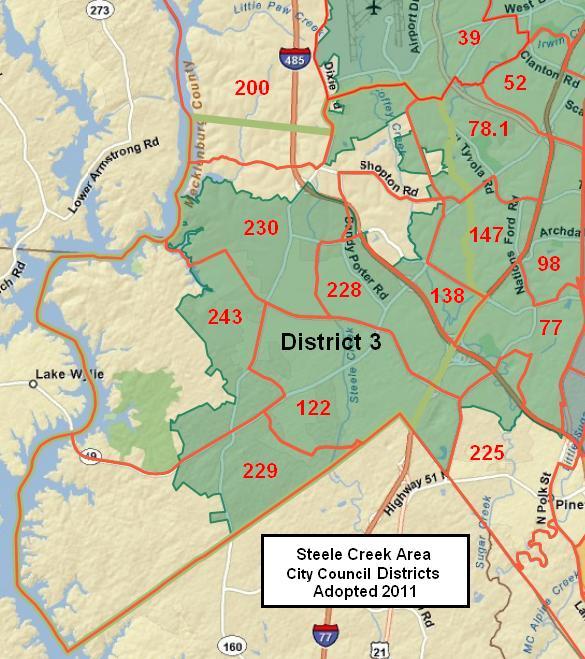
Charlotte City Council

The Charlotte City Council adopted new districts at its meeting on June 13, 2011. These districts were used for the November 2011 municipal election.

Charlotte City Council Districts

Go to Top

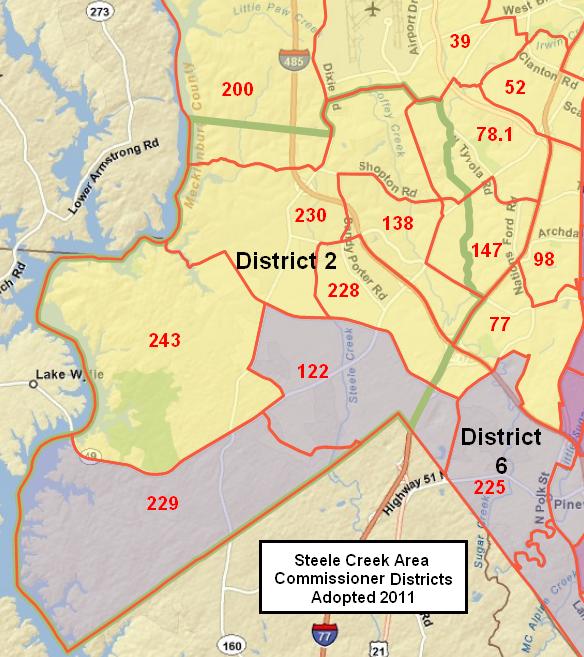
Mecklenburg County Commission

On July 28 the North Carolina General Assembly passed House Bill 719, which establishes new districts for the Mecklenburg Board of County Commissioners. They will be used for the 2012 elections.

Mecklenburg County Commissioner Districts

Go to Top

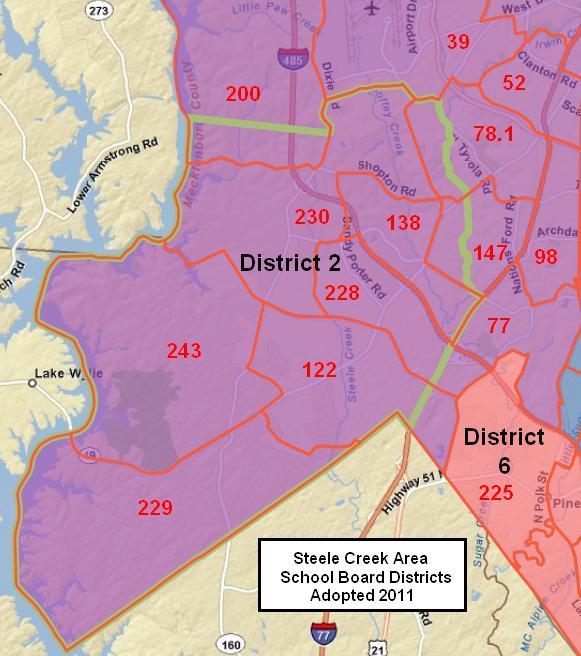
Charlotte-Mecklenburg Board of Education

The Charlotte-Mecklenburg Board of Education adopted new districts at its meeting on September 27, 2011.

School Board district and at-large representatives are elected every two years on a rotating schedule. All members serve four-year terms. Representatives for the three at large seats were chosen in the November 2011 election. The six district representatives will be up for election again in November 2013 based on the new districts.

Charlotte-Mecklenburg Board of Education Districts

Go to Top

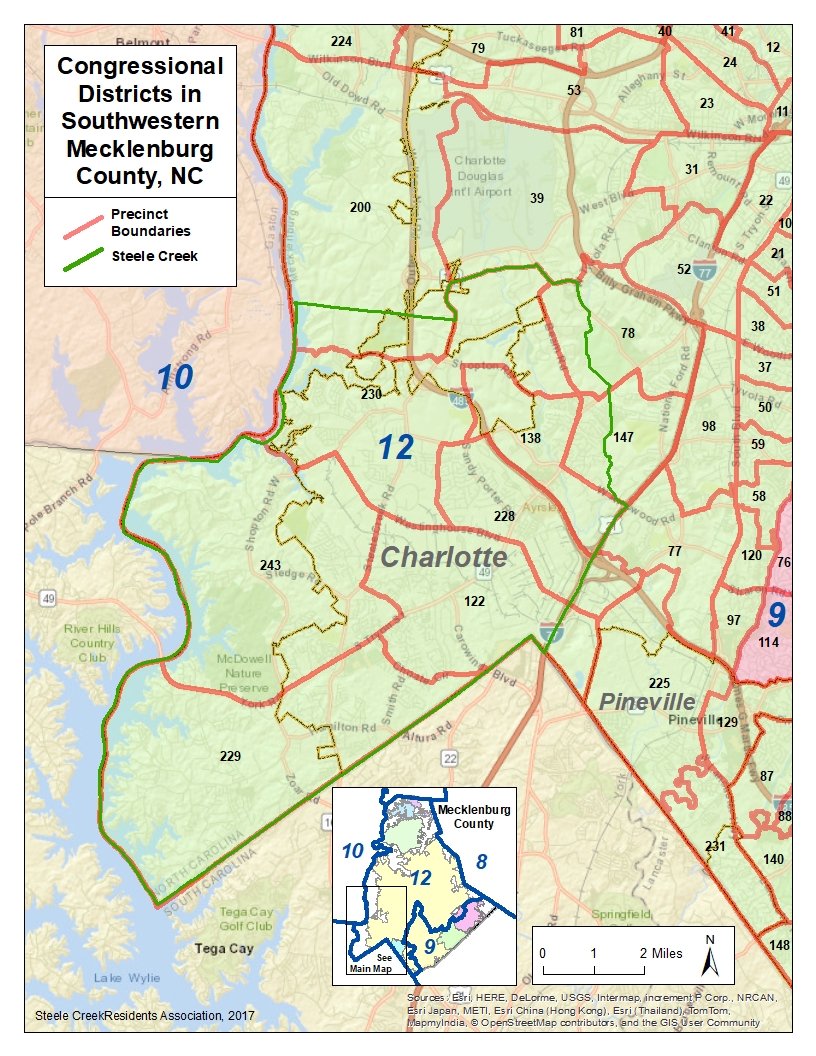
United States Congress

The General Assembly adopted new congressional districts on July 28, 2011. These have been challenged by several lawsuits and are subject to change before November 2012.

Congressional Districts

Go to Top

North Carolina Senate

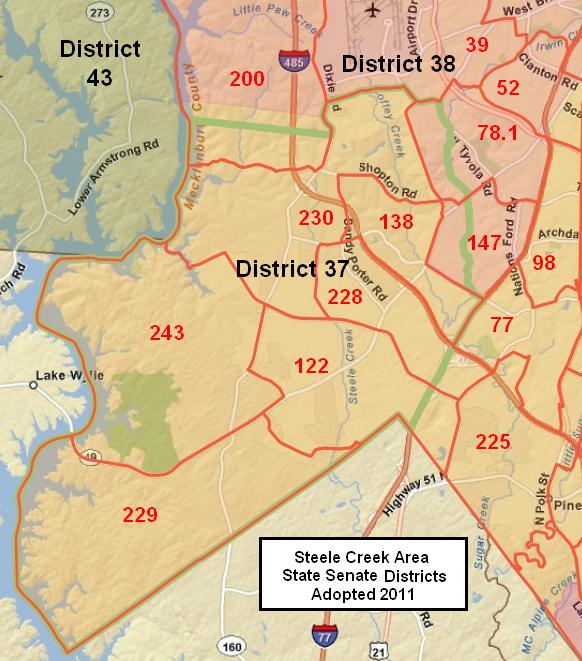
The General Assembly adopted new state senate districts on July 27, 2011. These have been challenged by several lawsuits and are subject to change before November 2012.

North Carolina Senate Districts

Go to Top

North Carolina House of Representatives

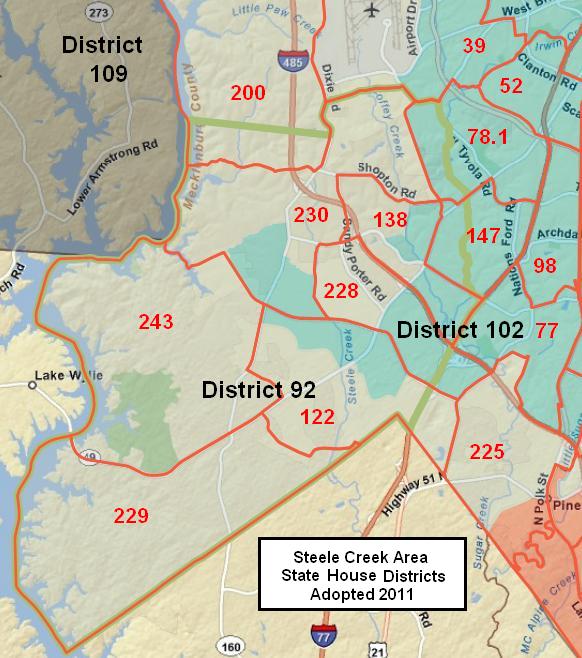
The General Assembly adopted new state house districts on July 28, 2011. These have been challenged by several lawsuits and are subject to change before November 2012.

North Carolina House Districts

Go to Top

Guide for Reviewing Mecklenburg County Election Districts in ArcGIS Explorer Online

Click on this link to open the maps in ArcGIS Explorer Online.

The initial map displayed shows Charlotte-Mecklenburg School Board districts.

Click and drag on the map to pan. Turn the mouse scroll wheel to zoom in and out. You may also press Shift and drag a box to zoom in.

Layers Icon   Click on the Bookmark icon in the upper right and select Steele Creek, Mecklenburg County, or North Carolina from the dropdown to zoom to each of those areas..

Layers Icon
  Click on the Layers icon on the left to see a list of layers and to turn them on and off.

Uncheck School Board Districts layer and check Congress, North Carolina Senate, North Carolina House, Commissioner Districts, or City Council Districts to turn each of those layers on. 

Click on the map with the Voting Districts layer turned on, and a popup appears identifying the Voting District at that location. Turn off the Voting District and Steele Creek layers and turn on a district layer. Click on the map and a popup appears identifying the district.
 
Legend Icon   Click on the Legend icon on the left to see which colors represent each district in the layers currently turned on.
Legend Icon


Click on the Basemap icon to select aerial imagery or other different base map layer.
Details Icon


Click on the Details icon for more information about the map.